Illustration of team collaborating with digital tools and devices

AgentsCommand: Multi-Agent AI Dashboard for Real Work | MT Labs

AgentsCommand: Multi-Agent AI Dashboard for Real Work

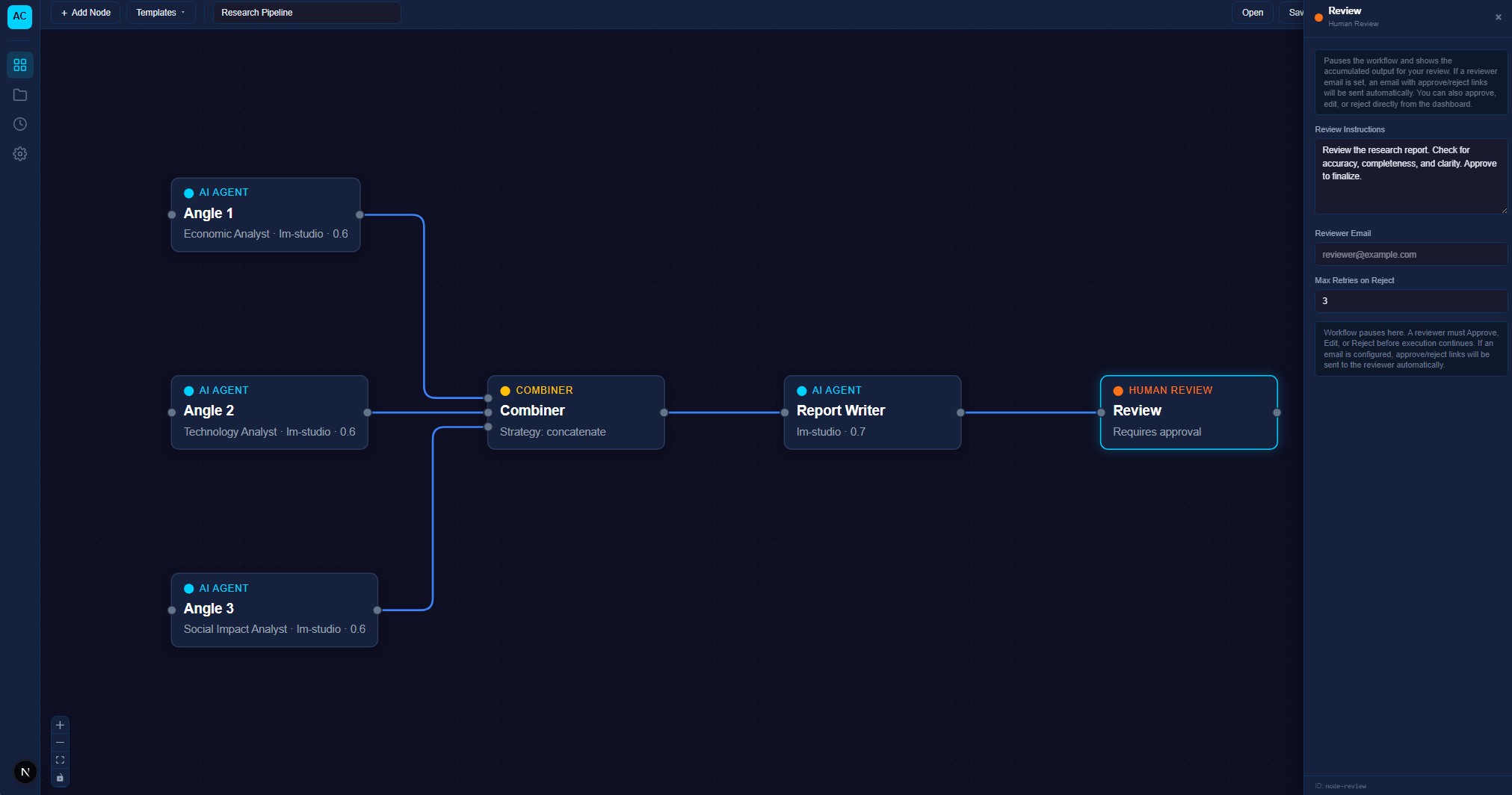
AgentsCommand is a visual orchestration platform built by MT Labs. Design your AI team node by node, give each agent a defined role and clear job scope, then run the whole workflow from one dashboard. Self-hosted, no cloud subscription and built so you can actually see what each agent is doing at every step.

The Problem With One-Shot AI Tools

Most AI tools give you one assistant. You type a prompt, it replies, you move on. For anything that needs real multi-step work (research then draft then edit, or triage then route then follow up), a single assistant is the wrong shape. You end up copy-pasting between tools, losing context and spending more time managing the AI than doing the work.

AgentsCommand gives you a coordinated team instead. Each agent has a defined role, a clear job scope and connects to the others in a workflow you design visually. You brief the workflow with a goal, the agents handle the handoffs between them and you see every step in the dashboard.
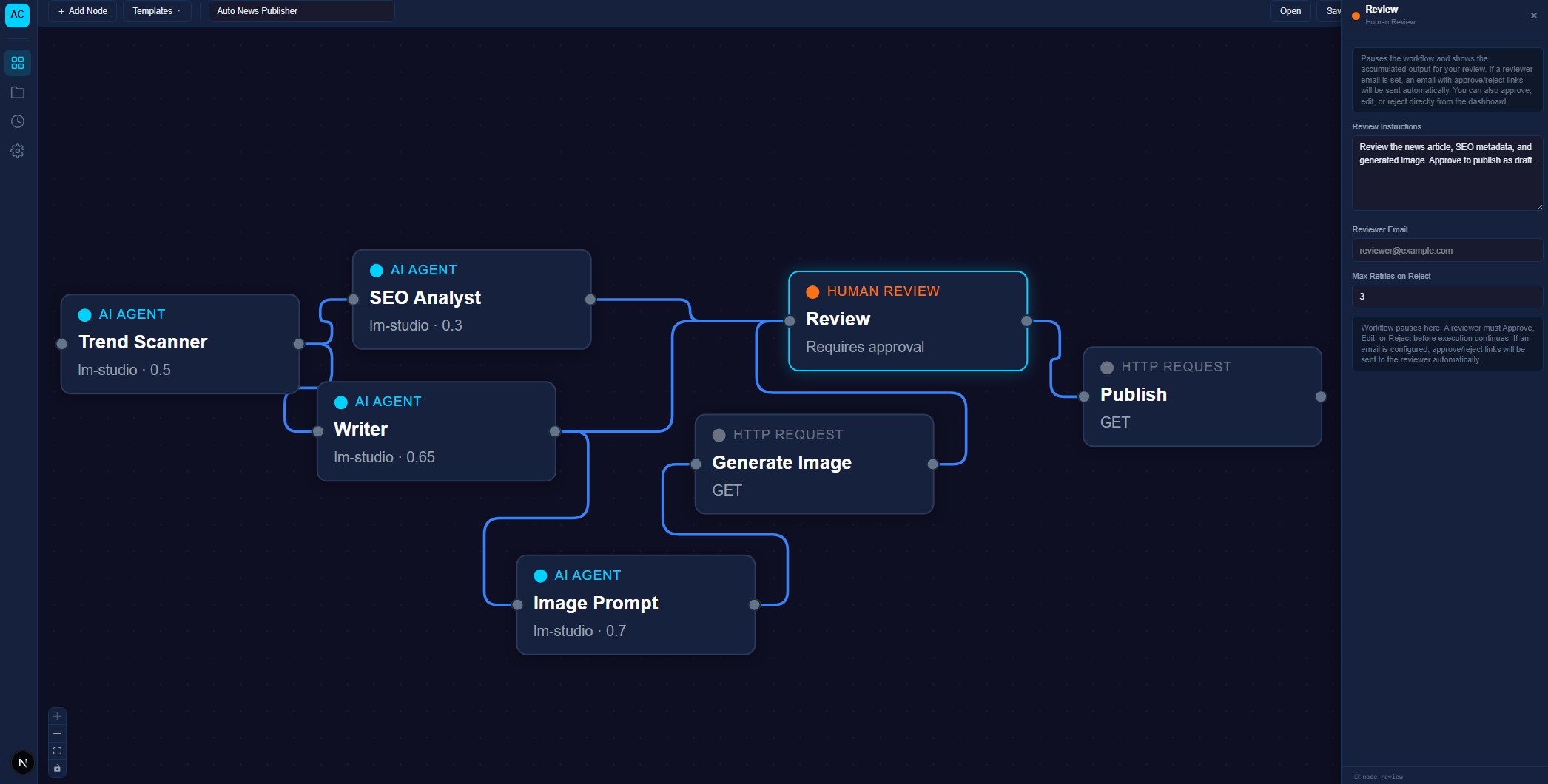
Flowchart of AI-driven content creation process with review and publication steps

How Node-Based Workflows Work

Design your AI team the way you would design any workflow. Teams familiar with tools like n8n, Zapier, or ComfyUI will recognize the pattern: each agent is a node on the canvas and you connect nodes together to show how work flows between them.

For each agent node, you set:

  • Role and persona. What this agent is responsible for, in plain language
  • Toolset. Which tools it can use (web search, database queries, email, file access, image generation, other APIs)
  • Model backend. Which LLM powers it (local Mistral, Qwen, Gemma, or a cloud API if preferred)
  • Memory scope. What context it carries between tasks and what it forgets
  • Handoff rules. When and how it passes work to the next agent

The result is a team of agents that each do one thing well, connected in a workflow you can inspect, debug and refine over time.

The Dashboard

Every workflow run shows up in the dashboard in real time. You see which agent is working on what, what tools each one called, what intermediate outputs they produced and where the workflow is in the chain. If an agent drifts, you can intervene. If you want to improve an agent’s performance, you can look back at its recent runs and see exactly where it did well and where it did not.

This observability is the difference between an AI workflow that quietly breaks and one that stays reliable as it scales. Most AI orchestration failures are not because the AI is bad. They are because no-one could see what happened until something went wrong.

What Teams Actually Use It For

The common patterns we see across deployments:

Content and Marketing Production

Research agent gathers sources on a topic. Drafter writes the first version. SEO optimizer tunes it for search and answer engines. Editor polishes for voice and consistency. One brief in, a finished draft out. Agencies and content teams use this to handle small-client work at a margin that otherwise would not work.

Customer Support Triage

Intake agent categorizes an incoming support message. Research agent pulls the relevant customer history and product context. Responder drafts the reply. Quality checker reviews before send. Humans handle the edge cases the team cannot automate. Response time drops and human support staff work on the cases that genuinely need them.

Sales Lead Qualification

Incoming enquiries (web form, email, WhatsApp) get parsed by an intake agent. Scorer agent checks fit against your ICP. Researcher pulls company info. Responder drafts a personalized first reply. Salespeople get their inbox pre-qualified and warm, not cold and chaotic.

Internal Research

Legal firms, consultancies and finance teams use agent workflows to synthesize across internal archives and external sources in minutes instead of days. Research agent pulls from your document stores. Summarizer condenses findings. Citation agent pulls verifiable references. Analyst produces a structured brief.

Document and Receipt Processing

Upload a folder of invoices, receipts, contracts, or compliance forms. Classification agent sorts them. Extraction agent pulls structured data. Validator cross-checks against your database. Exporter delivers the results into your ERP or accounting system.

Built on Open Infrastructure

AgentsCommand runs on your own hardware. The orchestration layer is always local, so your workflow definitions, memory and intermediate data stay within your network. The agents themselves can call local models (Mistral, Qwen, Qwen) or cloud APIs if you prefer and mix the two within a single workflow.

Connectors exist for Google Workspace, Slack, WhatsApp (personal and WhatsApp Business API), WordPress, Notion and most SQL and vector databases. Custom integrations are added through a standard tool-use interface, so connecting AgentsCommand to your existing stack is a matter of hours, not weeks.

Flowchart diagram showing process steps with nodes and connections

Why Build Your Own Agent Team Instead of Buying One

Commercial agent platforms charge per user, per agent, or per run. The economics stop making sense quickly once workflows scale. And the agents you build on someone else’s platform are bound to their roadmap, pricing and deprecation cycles.

Building your agent team on AgentsCommand means: you own the workflow definitions, you own the memory, you own the model choice and you can fine-tune any agent on your data without exposing it externally. For any team that expects AI to become a long-term piece of operational infrastructure, this is the only setup that scales economically and stays under your control.

Getting Started

Most clients start with one workflow (a single content pipeline, a support triage flow, or a document processor) and expand once that first workflow proves itself. The setup is usually 2-3 weeks from first call to production, including agent design, integrations and team onboarding. After that, adding new workflows takes days, not weeks.

If you have been looking at commercial agent platforms and flinching at the pricing, or if you have already run into the limits of what single-assistant tools can do, AgentsCommand is worth a conversation.

MT Labs helps companies across Singapore deploy AI tools they actually own. Private infrastructure, no recurring cloud subscriptions and a setup built around how your team already works. Whether you need a small assistant for one team or a full agentic AI for the whole company, we size the setup to what you need and what your team can manage. Get in touch and we’ll map it out with you.

Related reading:

Blue background with white icon resembling a speech bubble with a checkmark

Frequently Asked Questions

What is AgentsCommand?

AgentsCommand is a self-hosted multi-agent AI platform from MT Labs. You design workflows by connecting agents on a visual canvas, give each agent a role and toolset and the dashboard orchestrates the whole team. It is built for small teams that want coordinated AI work without wiring infrastructure themselves.

How is AgentsCommand different from n8n or Zapier?

n8n and Zapier are general automation tools. AgentsCommand is purpose-built for AI agent coordination, which means first-class support for LLM reasoning, shared memory between agents, tool-use loops and human handoff. You can run n8n and AgentsCommand side by side if you already have n8n running.

Does it run locally?

Yes. AgentsCommand runs on your own server or workstation. It can connect to local LLMs (Mistral, Qwen, Gemma) served through inference engines like vLLM or llama.cpp for full offline use, or call cloud APIs if you prefer. The orchestration layer itself is always local.

What use cases work best?

Blog and content production (research agent + writer agent + SEO agent + editor agent), customer support triage, sales lead qualification, internal document processing and research agents that pull from multiple sources. Workflows with 3-6 agents hit the sweet spot.

What does it cost?

Pricing depends on how many seats and whether you want hosted or self-managed deployment. There is no per-agent or per-run fee. Get in touch for a quote sized to your team.

Can I connect it to our existing tools?

Yes. AgentsCommand has connectors for Google Workspace, Slack, WhatsApp, WordPress, Notion and most databases. Custom integrations can be added through a standard tool-use interface.

Chat with AI

Hello! I'm MTLabs AI, How can I help you today?