

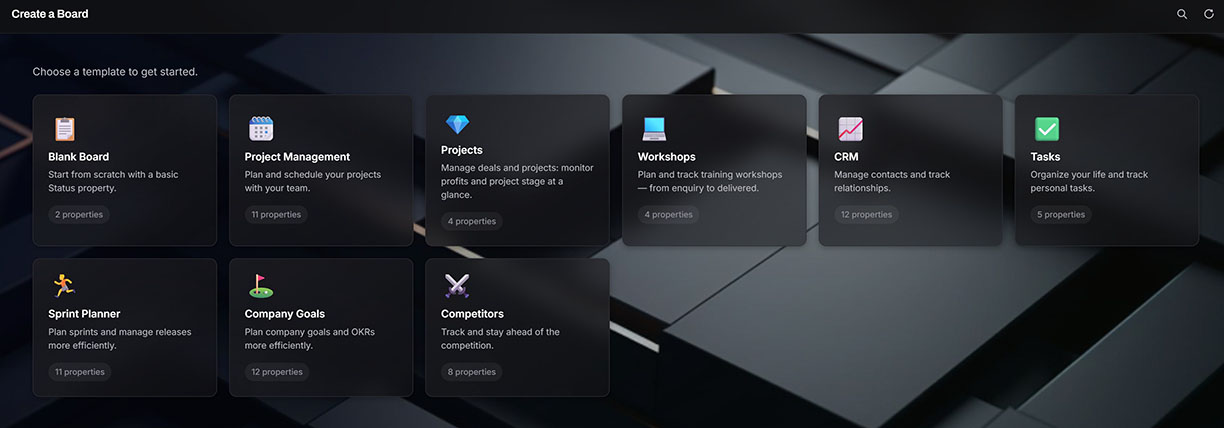
Most teams run their work across four tools at once: a project board, a separate CRM, an email platform, and a spreadsheet for the numbers. This is a fair, honest roundup of ten project management apps worth trying in 2026. For each one you get what it does best, what it costs, and where it falls short, so you can pick the tool that fits how your team actually works.
There is no single best project management app. The right choice depends on your team size, how technical your people are, and how much you care about owning your own data. So treat this as a roundup, not a strict ranking. We have kept the order loose on purpose.
One of the ten, Projecto, is built by us at MT Labs. We have placed it in the middle of the list on merit, not at the top, and we are upfront about what it does and what it does not do. You will see the same honest treatment for every other tool here.
A quick note on pricing: all prices are in USD and were correct at the time of writing. Vendors change their plans often, so check the current rate before you commit.
The 10 apps at a glance
| App | Best for | From (USD/user/month) | Built-in CRM | Self-hosting |
|---|---|---|---|---|
| Trello | Simple visual boards | 5 | No | No |
| Asana | Structured team projects | 10.99 | No | No |
| Monday.com | Visual, non-technical teams | 9 (3-seat minimum) | Separate product | No |
| ClickUp | All-in-one power users | 7 | Build it yourself | No |
| Notion | Docs and tasks in one | 10 | Build it yourself | No |
| Projecto | Own-it PM, CRM and email | Get in touch | Yes, native | Yes |
| Airtable | Custom databases | 20 per editor | Build it yourself | No |
| Basecamp | Simple all-in-one | 15 | No | No |
| Wrike | Structured work at scale | 10 | No | No |
| Jira | Software teams | around 7.50 | No | Winding down |
1. Trello
Trello, owned by Atlassian, is the simplest way to get a team onto a shared board. It is a visual Kanban tool built around lists and cards you drag from one stage to the next. If someone on your team has never used a project tool before, they will understand Trello in about a minute.
Standout features:
- Drag-and-drop Kanban boards, lists, and cards
- Power-Ups to add extra views and integrations
- Butler automation for simple rule-based tasks
Pricing: Free plan with unlimited cards, up to 10 boards per workspace and 250 automation runs a month. Paid plans start at USD 5 per user per month, billed annually.
Worth knowing: Trello scales poorly once work gets complex. There are no native dependencies or Gantt views on the basic plans, and no built-in CRM or email marketing. It is a task board, not a full work platform.
2. Asana
Asana is a structured, enterprise-grade work platform for teams that need more than a board. It handles cross-team coordination, reporting, and capacity planning, and it is a common choice once a company outgrows lightweight tools.
Standout features:
- List, board, calendar, and timeline (Gantt) views
- Workflow automation with Rules and unlimited forms
- Portfolios, Goals, and Workload for planning across teams
Pricing: Free for up to 2 users. Paid plans start at USD 10.99 per user per month, billed annually.
Worth knowing: The most useful features, such as Timeline and Portfolios, sit behind paid tiers, and the per-seat cost adds up quickly for a growing team. It can feel heavy for a very small group. No native CRM or email marketing.
3. Monday.com
Monday.com is a visual work platform that non-technical teams tend to love. Its colour-coded, spreadsheet-style boards are quick to set up and easy to read at a glance, which makes it popular with marketing, operations, and HR teams.
Standout features:
- Highly visual boards with colour-coded statuses
- Kanban, Gantt, timeline, calendar, and workload views
- No-code automations and 200-plus templates
Pricing: Free plan limited to 2 users and 3 boards. Paid plans start at USD 9 per seat per month, billed annually, with a 3-seat minimum, so the real floor is around USD 27 a month even for one or two people.
Worth knowing: Costs climb fast as you add people, and a true CRM is a separate paid product (monday CRM), not part of the core work platform. Email marketing is not built into the work product either.
4. ClickUp
ClickUp aims to be the one app that replaces all the others. It packs tasks, docs, whiteboards, chat, goals, and time tracking into a single, deeply customisable workspace. If your team likes to tinker and standardise everything, ClickUp gives you the room.
Standout features:
- 15-plus views, from list and board to Gantt and mind map
- Native docs, whiteboards, and built-in time tracking
- Strong automations and reporting dashboards
Pricing: Free Forever plan with unlimited tasks and members but tight storage and automation limits. Paid plans start at USD 7 per user per month, billed annually. AI (ClickUp Brain) is a separate add-on.
Worth knowing: All that flexibility brings a steep learning curve, and the interface can feel cluttered until you tune it. You can build a CRM from a template, but it is not purpose-built, and there is no bulk email marketing.
5. Notion
Notion is a connected workspace that blends docs, wikis, notes, and databases with project tracking. Teams choose it when they want their documentation and their tasks living in the same place, fully shaped to their own way of working.
Standout features:
- Flexible relational databases with table, board, calendar, timeline, and gallery views
- Docs, wikis, and tasks in one workspace
- Deep customisation through templates and linked databases
Pricing: Free for individuals with small-team collaboration limits. Paid plans start at USD 10 per user per month, billed annually. Notion AI now sits inside the higher Business tier at USD 20 per user per month.
Worth knowing: The flexibility that makes Notion great also means real setup effort before it works as a project tool. It has no native task dependencies, and large databases can slow down. You can build a CRM inside it, but there is no native email marketing.
6. Projecto
Full disclosure again: Projecto is our own app, built here at MT Labs, so read this section knowing that. We have kept it honest.
Projecto is an all-in-one workspace that brings project management, a sales CRM, a lead finder, email marketing, and a live revenue dashboard into one app, all sharing the same contacts and the same data. The idea is simple. Instead of your people becoming the integration between four tools, everything talks to each other on one screen, with AI built into every step.
Standout features:
- Four views of the same work (Board, Table, Gallery, Calendar), 18 field types, and rich documents
- A smart CRM that uses AI to pull contacts out of WhatsApp, email, and messy text, then dedupes them for you
- A built-in Lead Finder that discovers prospects and captures them straight into the CRM
- Newsletter campaigns built in, with AI-drafted copy, click tracking, and one-click unsubscribe, so your CRM is also your mailing list
- A live revenue dashboard covering pipeline, confirmed revenue, expenses, and profit
- Runs as a managed subscription or as a private deployment on your own infrastructure, with local models (Mistral, Qwen, Gemma, GPT OSS), unlimited users at a flat cost, and your data staying with you
Pricing: Not publicly released yet. Get in touch for a demo and we will size it to your team.
Worth knowing: Projecto is newer than the incumbents on this list, so the template and integration library is smaller today. Self-hosting means running it on your own server, though we handle the setup. Full details are on the Projecto portfolio page.
7. Airtable
Airtable looks like a spreadsheet but works like a relational database. It suits teams that need custom trackers and internal apps rather than a fixed project template, and it is a favourite of marketing, content, and operations teams.
Standout features:
- Relational bases with rich field types, links, and rollups
- Grid, kanban, calendar, gallery, and timeline views
- Interface Designer to build custom apps and dashboards on top of your data
Pricing: Free plan for up to 5 editors with a record cap per base. Paid plans start at USD 20 per editor per month, billed annually.
Worth knowing: Per-editor pricing and per-base record caps get expensive at scale, and because it is a database first, it needs real setup before it feels like a project tool. You can build a CRM in it, but email is limited to basic notifications, not true campaigns.
8. Basecamp
Basecamp is the opinionated, no-frills option. It bundles message boards, to-dos, chat, docs, and schedules into one calm workspace, with a flat-rate plan that appeals to agencies and distributed teams tired of per-seat maths.
Standout features:
- Everything for a project on one page: to-dos, docs, chat, and schedule
- Hill Charts that show where work really stands, not just a percentage
- A flat-rate Pro Unlimited plan, with clients and contractors added for free
Pricing: Free plan for 1 project and up to 20 users. The paid plan is USD 15 per user per month, and Pro Unlimited is USD 299 a month, billed annually, for unlimited users.
Worth knowing: Basecamp is deliberately minimal. There are no Gantt charts, task dependencies, or custom fields, and no native CRM or email marketing. Teams that need structured, complex project management often outgrow it.
9. Wrike
Wrike is a robust work platform built for mid-market and enterprise teams that need Gantt charts, resource management, proofing, and detailed reporting. It is a strong fit for marketing, creative, and professional-services groups running structured work at scale.
Standout features:
- Interactive Gantt charts, custom workflows, and dynamic request forms
- Resource and workload planning on higher tiers
- Proofing and approvals for creative assets, plus native time tracking
Pricing: Free plan with a 200-task cap. Paid plans start at USD 10 per user per month, billed annually. Seats are sold in fixed bands, so a 6-person team pays for 10 seats.
Worth knowing: Wrike has a denser interface and a steeper learning curve than lighter tools, and the band-based seat pricing means you often pay for seats you do not use. No native CRM or email marketing.
10. Jira
Jira, also from Atlassian, is built for software teams. If you run Scrum or Kanban with backlogs, sprints, and story points, and you live in the Atlassian ecosystem, Jira is hard to beat for agile work.
Standout features:
- Deep agile tooling: boards, backlogs, sprints, and reports like burndown and velocity
- Highly configurable workflows, issue types, and permissions
- Strong developer integrations and a large marketplace of add-ons
Pricing: Free for up to 10 users. Paid plans start at around USD 7.50 per user per month, on a sliding scale that drops as your team grows.
Worth knowing: Jira is overkill and unintuitive for non-technical, general business teams. It offers a self-hosted option through Data Center, but Atlassian is winding that down: new Data Center sales end on 30 March 2026, with full end of life in 2029, so self-hosting is not a durable long-term path for new customers. No native CRM or email marketing.
How to choose the right project management app
Start with the job, not the brand.
- If you want the simplest possible board, look at Trello or Basecamp.
- If you want a visual platform for a non-technical team, look at Monday.com or Asana.
- If you want maximum flexibility and do not mind setup, look at ClickUp, Notion, or Airtable.
- If you run software development, Jira is the specialist.
- If you want structured work at enterprise scale, Wrike fits.
- If you want project management, a CRM, lead finding, and email in one app that you can own and keep on your own infrastructure, look at Projecto.
One pattern is worth noticing. Most of these tools solve the board well, but few include a CRM or email marketing, so teams still end up paying for a stack of separate per-seat subscriptions that do not talk to each other. If consolidating that stack and keeping your data in Singapore matters to you, that is the gap we built Projecto to close.
MT Labs helps companies across Singapore deploy AI tools they actually own. Private infrastructure, no recurring cloud subscriptions, and a setup built around how your team already works. AI isn’t right for every workflow, and part of our job is telling you where it isn’t. Get in touch and we’ll walk through where it makes sense, and where it doesn’t, for your business.
FAQ
What is the best project management app in 2026?
There is no single best app. The right choice depends on your team size, how technical your people are, and whether you want to own your data. A small team may be happiest on Trello, while a growing SME that wants a CRM and email in the same tool may prefer Projecto.
Which project management apps have a free plan?
All ten here offer a free tier, though the limits vary. Trello, ClickUp, Basecamp, Airtable, Wrike, Asana, Notion, Monday.com, and Jira all have free plans with caps on users, boards, tasks, or storage.
Which project management app has a built-in CRM?
Most do not have one natively. Monday.com sells a separate CRM product, and Notion, Airtable, and ClickUp let you build one from a template. Projecto includes a native smart CRM that shares contacts with the rest of the app.
Can I self-host a project management app?
Most of these tools are cloud-only. Jira offers self-hosting through Data Center, but new sales end on 30 March 2026. Projecto offers a private deployment on your own infrastructure, which keeps your data with you and helps with PDPA compliance.
Which apps include email marketing or newsletters?
Native email marketing is rare. Most teams add a separate tool such as Mailchimp. Projecto has newsletter campaigns built in, so your CRM doubles as your mailing list.
How much do project management apps cost?
Entry paid tiers generally run from about USD 5 to USD 20 per user per month, with free plans available at the bottom. Watch for seat minimums and band-based pricing, which raise the real cost for small teams.
How do I pick the right one for my team?
Write down the jobs you need it to do, count your users, and decide how much you care about owning your data. Match those three answers to the tools above, then trial your shortlist before you commit.
