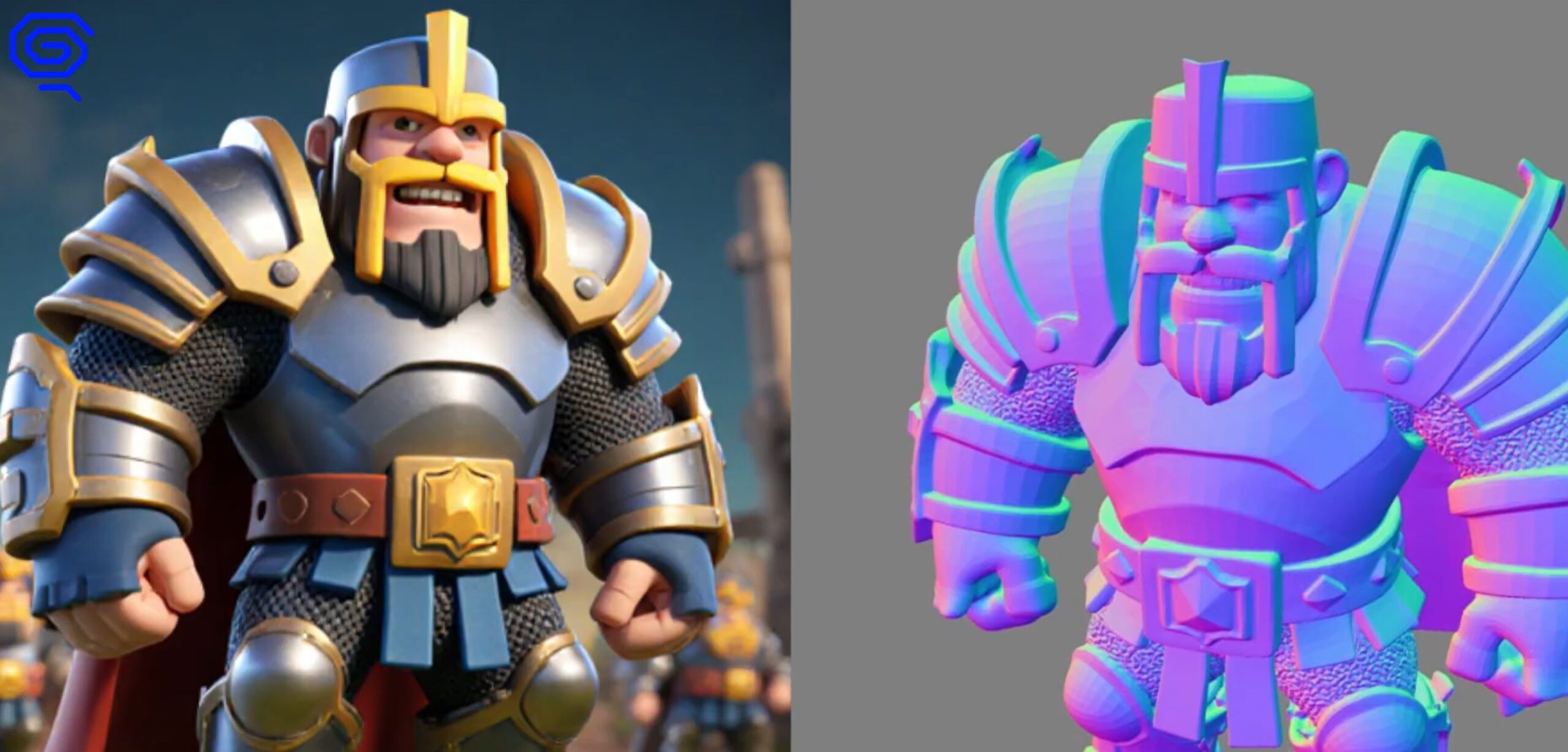

Two armored warriors: one detailed, one stylized with vibrant gradient colors

Image to 3D Model: Private AI Tool for Production Assets | MT Labs

Image to 3D Model: A Private AI Tool for Production Assets

Our Image-to-3D tool converts any flat image into a production-ready 3D asset in GLB format. Rotate it, view from any angle and export for animation, game development, e-commerce, architecture, or product visualization. No 3D modeling skills required. Built on a local generative system, your images never leave your environment.

What the Tool Does

Upload a photo or flat illustration of a product, object, or character. The tool reconstructs a 3D mesh from the image, generates the textures and exports a GLB file you can open in Blender, Unity, Unreal Engine, Three.js, or any modern 3D pipeline. A process that used to take a modeller hours per asset happens in under a minute.

Why GLB and Why Local

GLB is the binary version of glTF, the open 3D format maintained by the Khronos Group. It packages geometry, materials and textures into a single file, loads quickly in web and real-time engines and is supported across every major 3D tool. No proprietary format lock-in, no conversion step.

Running the tool locally matters for businesses working on unreleased products, internal prototypes, or client work under NDA. Cloud image-to-3D services retain your uploads and often reserve rights to use generated content for training. With local deployment, your source photos and generated assets stay in your network. For e-commerce catalogues with unreleased SKUs, architectural firms handling confidential projects, or heritage teams digitizing one-of-a-kind artefacts, that matters.

What It Is Good For

  • E-commerce product visualization. Turn product photos into 3D previews for AR try-on, rotatable product viewers, or catalogue generation at scale.
  • Game development and prototyping. Rapid prop and asset creation from concept art or reference images. Useful for small studios, game jams and pre-production.
  • Architecture and interior design. Convert furniture photographs into 3D assets for room layouts and client walkthroughs.
  • Heritage and education. Digitize artefacts from photographs for museum archives, classroom material, or virtual exhibits.
  • Animation and film. Generate background props and secondary assets faster than manual modeling, leaving the modeller time for hero assets.
  • Marketing and advertising. 3D assets from flat campaign visuals for banner animation, web experiences and AR filters.

What Makes a Good Source Image

The tool performs best with:

  • Clean, well-lit photos on a neutral or simple background
  • The subject centered and fully visible, not cropped
  • Reasonable resolution (1024 px or higher on the short edge)
  • One clear subject per image, not a cluttered scene

If results come back weak, the fix is usually a quick background removal or tighter crop on the source image. For production use, most teams run a simple pre-processing step (automatic background removal, standardized aspect ratio) before feeding images into the tool.

Where It Falls Short

Worth naming honestly:

  • Complex scenes reconstruct less reliably. One chair on a table is easy. A living room with ten overlapping objects is not. Split the shot or pick simpler references.
  • Transparent and reflective surfaces are hard. Glassware, chrome, water. Plan on manual touch-up or a different approach for these.
  • It will not replace a skilled 3D artist for hero assets. For hero characters, vehicles, or anything that demands topology quality, use generated assets as a base and have an 3D artist to refine.
  • Textures may need a second pass. Generated textures work for real-time previews and AR, but print-quality or close-up renders often benefit from 3D artist refinement pass.

Used as a first-pass tool to multiply what small teams can produce, it pays off consistently. Used as a replacement for skilled 3D work on hero pieces, it disappoints.

How Teams Deploy It

Most teams start with a single workstation installation to test the tool on their actual pipeline. Once the workflow settles, production teams move to a dedicated inference server so multiple people can generate concurrently without contention. Integration into existing asset pipelines (Blender, Unity, e-commerce CMS, AR platforms) is straightforward through file export or API.

For teams that already run AgentsCommand or other MT Labs infrastructure, the Image-to-3D tool slots in as another capability behind the same agent fabric: an agent can receive a product photo, generate a 3D version and route it into your catalogue or design tool automatically.

MT Labs helps companies across Singapore deploy AI tools they actually own. Private infrastructure, no recurring cloud subscriptions and a setup built around how your team already works. Whether you’re exploring your first AI use case or consolidating scattered tools into one system, we’ll walk you through it. Get in touch and let’s figure out what makes sense for your business.

Blue background with white icon resembling a speech bubble with a checkmark

Frequently Asked Questions

What file format does the 3D model export in?

GLB, the web-friendly binary version of glTF. It opens in Blender, Unity, Unreal, Three.js, Babylon.js and most AR/VR pipelines. No proprietary format, no conversion step.

Does the tool run in the cloud or locally?

Locally. The generative system runs on your own hardware, so your images never leave your environment. This is useful for product teams with unreleased designs or architectural firms working on confidential projects.

What image types work best?

Clean, well-lit product shots on a neutral background convert most reliably. Photos with busy backgrounds, low contrast, or multiple subjects produce weaker 3D reconstructions. If the result is off, a quick background removal usually fixes it.

Can I use the 3D assets commercially?

Yes. Because the generation runs on your hardware and the source image is yours, the output belongs to you. No licensing constraints from us.

What hardware do I need?

A workstation-class GPU (RTX 5090 32GB VRAM or better) handles most conversions in approximately a minute or two.

How does this compare to cloud services like Meshy or Tripo?

Cloud services are easier to start with but with limited free credits and retain your data. Our local deployment has a higher upfront setup but no per-generation cost, full privacy and runs offline. The right choice depends on volume and data sensitivity.

Chat with AI

Hello! I'm MTLabs AI, How can I help you today?