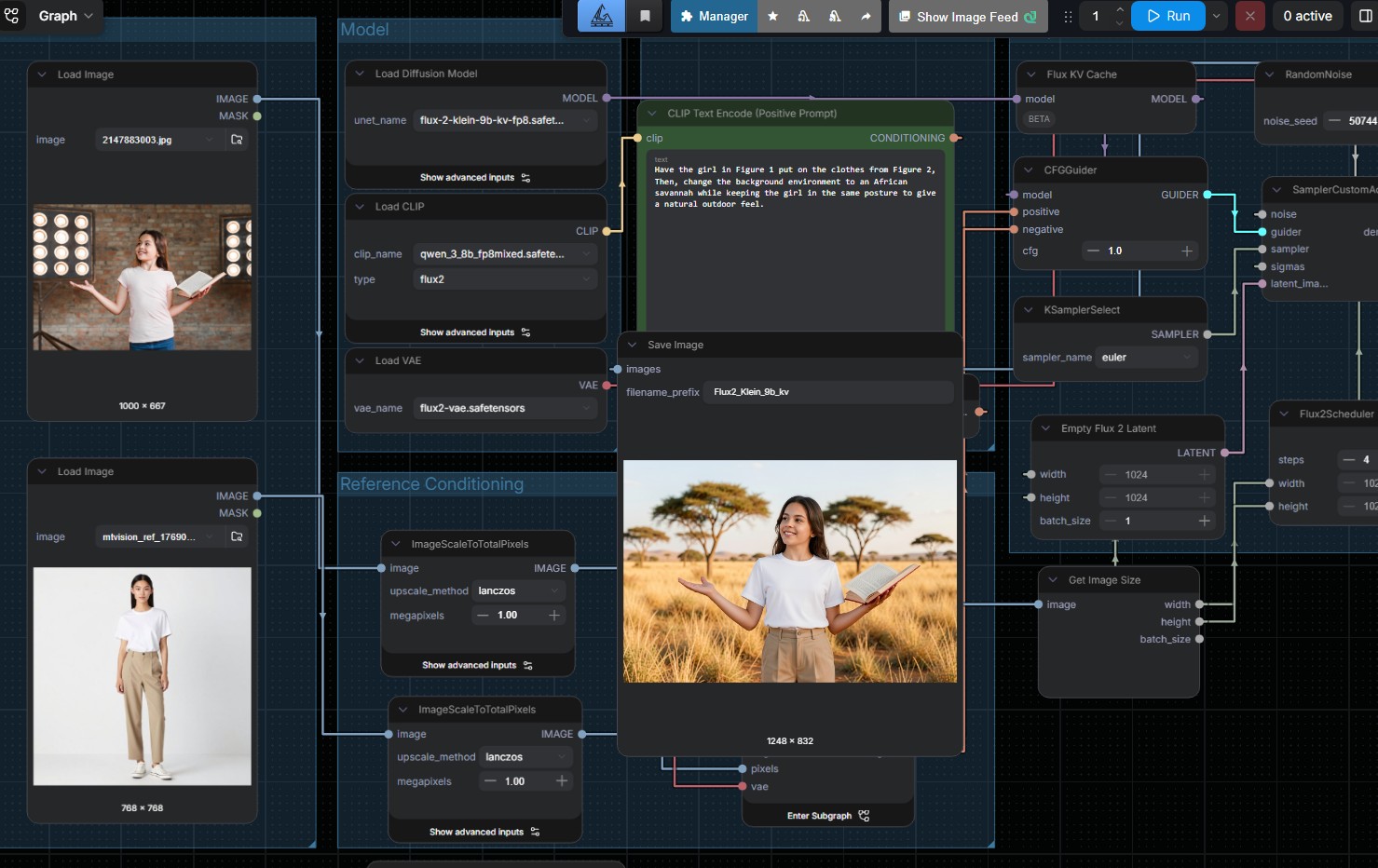

Digital workflow interface with image editing nodes and preview window

ComfyUI: Private AI Image Generation for Business Use

ComfyUI: Private AI Image Generation for Business Use

ComfyUI is a node-based interface for running Stable Diffusion and other image generation models locally on your own hardware. Unlike cloud image generators (Midjourney, DALL-E) that charge per image and retain your generated content, ComfyUI runs offline, costs nothing per generation and keeps your creative assets and brand IP on your infrastructure. For Singapore businesses with ongoing creative workflows, it is the operational answer to cloud image generation fatigue.

What ComfyUI Actually Is

ComfyUI is an open-source graphical interface for AI image generation. Instead of typing a prompt into a chatbot and hoping for the best, you build an image generation workflow visually by connecting nodes: text encoder, image sampler, upscaler, control networks, post-processing. Each node represents a specific step and you can see, tune and reuse every part of the process.

Under the hood, ComfyUI runs models from Flux, Qwen, Z Image. These are open-weight models you download once and run locally for as long as you have the hardware. No subscription, no per-image fee, no terms-of-service risk on your generated content.

Why This Matters for Businesses

Most teams first encounter AI image generation through Midjourney, Freepik, ChatGPT, or Firefly. These tools are easy to start with, but at scale they introduce three recurring problems:

1. Cost scales badly

Cloud image generators typically charge per image, per subscription seat, or both. A design team producing hundreds of images per week sees monthly invoices in the thousands. ComfyUI on your own hardware has zero per-image cost after setup.

2. Brand IP and confidentiality leak

When you generate product images, campaign visuals, or creative concepts on a cloud service, that content crosses into someone else’s infrastructure. Some services retain rights to use it for training. For teams working on unreleased products, confidential campaigns, or regulated industries, this is a real concern. Local generation removes it.

3. Limited control and reproducibility

Cloud tools give you a prompt box. ComfyUI gives you the full pipeline. You can tune lighting, composition, style transfer and post-processing at a granularity cloud tools do not expose. You can save a workflow as a template and reproduce the exact look across hundreds of images.

What ComfyUI Is Good At

  • Brand-consistent creative. Save workflows tuned for your brand style, run them across product shoots, campaign variants and social assets. Consistent output, no human retune needed.
  • Product visualization at scale. E-commerce teams generating lifestyle shots, colour variants, or context scenes for product catalogues. Hundreds of images from one base photograph.
  • Concept exploration for design teams. Rapid iteration on visual directions without waiting for a rendering or photography cycle.
  • Image-to-image and ControlNet workflows. Use a sketch, pose reference, or structural image as input, generate variations that match the composition.
  • Upscaling and restoration. Turn small source images into high-resolution outputs suitable for print or large display.
  • Integration into content pipelines. ComfyUI exposes an API, so it plugs into automated workflows. Our AgentsCommand platform can drive ComfyUI as part of a multi-agent content production workflow.

What ComfyUI Is Not

Honest trade-offs:

  • It has a learning curve. Node-based interfaces reward patience. A designer used to typing a prompt into Midjourney will need a few hours to get comfortable. Once past that, the productivity gap reverses.
  • It needs hardware. A decent workstation GPU (RTX 5090, 4090, or similar) is the minimum for serious use. Older or lower-end GPUs will work but with slower generation times.
  • The newest proprietary cloud models sometimes edge ahead. For the very frontier of photorealism, some cloud tools lead briefly before open-weight models catch up. The gap closes within months and for most brand and production work, open-weight is already strong enough.
  • It is not the right tool for one-off personal use. If you need 5 images a month for occasional personal work, a cloud service is simpler. ComfyUI pays off at volume and for teams with IP sensitivity.

Hardware You Will Need

Practical hardware shapes for business use:

  • Small creative team (1-5 users, steady volume): A workstation with an RTX 4070 or RTX 4090, 32GB RAM. Single-user generation in 5-20 seconds per image.
  • Studio or agency (5-20 users, heavy volume): Dedicated inference server with RTX 5090 GPU, 64GB RAM or more. 1-10 seconds per image. Multi-user concurrent generation.
  • Production pipeline (automated, high volume): Multi-GPU setup with load balancing. We build or help you spec the right server based on throughput requirements.

How to Start If ComfyUI Fits Your Team

A sensible path:

  1. Identify the workflow. Pick one specific creative task where AI image generation already provides value (concept visualization, product variants, social assets). Start there.
  2. Set up a test environment. Install ComfyUI on an existing workstation if you have a decent GPU, or deploy on a small server. Explore publicly available workflow templates.
  3. Build a branded workflow. Tune a workflow for your brand: the right base model, style reference, post-processing steps. This becomes your team’s template.
  4. Integrate into the production pipeline. Connect ComfyUI to your asset management, design tools, or content system. Automate what is repetitive.
  5. Expand. Once one workflow is paying off, add the next one. Product photography, then social content, then campaign concepts.

The businesses that get the most out of ComfyUI are the ones that treat it as a creative infrastructure investment, not a one-off tool. A well-tuned ComfyUI setup becomes a long-term asset that keeps paying off as your creative volume grows.

MT Labs helps companies across Singapore deploy AI tools they actually own. Private infrastructure, no recurring cloud subscriptions and a setup built around how your team already works. Most of our clients start with one use case, a WhatsApp agent, a document processor, a local assistant and grow from there. Get in touch and we’ll figure out the right first step.

Blue background with white icon resembling a speech bubble with a checkmark

Frequently Asked Questions

What is ComfyUI?

ComfyUI is an open-source graphical interface for running AI image generation models locally on your own hardware. Instead of typing prompts into a chatbot, you build image generation workflows visually by connecting nodes. It runs offline, costs nothing per image after setup and keeps your creative assets on your infrastructure.

Is ComfyUI free?

Yes. ComfyUI itself is free open-source software and the underlying models (Qwen, Z-Image, Flux) are free open-weight models. Your only cost is hardware and the engineer time to set it up. No per-image fees, no subscription.

What hardware does ComfyUI need?

For small creative teams, a basic spec with an RTX 4070 and 32GB RAM is the minimum. For studios or agencies with multiple concurrent users, a RTX 5090 with 64GB RAM will be recommended. We also include hardware builds.

ComfyUI vs Nanobanana, Freepik, Leonardo, Midjourney: which is better for business?

For volume or IP-sensitive work, ComfyUI is better because there are no per-image fees, no confidentiality concerns with generated content and full control over the generation pipeline. Cloud Apps is easier for occasional personal or exploratory use. For teams producing hundreds of images per week, ComfyUI pays off quickly.

Can I use ComfyUI-generated images commercially?

Yes, commercial use of open-sourced Check specific model licences for any fine-tunes you use. Because generation runs on your hardware and the source prompt is yours, the output belongs to you.

Is ComfyUI hard to learn?

There is a learning curve. Node-based interfaces reward patience. A designer used to a Freepik prompt box will need a few hours to get comfortable. Once past the learning curve, the productivity gap reverses because you can save workflows, reproduce outputs exactly and tune parts of the pipeline that prompt-only tools do not expose.

Can ComfyUI integrate with our existing content workflow?

Yes. ComfyUI exposes an API so it plugs into automated pipelines, content management systems and agentic workflows. Our AgentsCommand platform can drive ComfyUI as part of a multi-agent content production flow, so you can go from brief to finished visual through one automated pipeline.

Chat with AI

Hello! I'm MTLabs AI, How can I help you today?