Features

FileSync is a file sync system built by MT Labs. It keeps folders in step across every Windows PC and server on your network, runs scheduled backups, and pushes the same files out to many machines at once, all from one dashboard. Files travel over your own network and never pass through an outside cloud service.

Most organisations we meet have files spread across dozens of PCs, with a different copy of the same document on each. Someone copies folders by hand at the end of the week, or a consumer cloud drive quietly holds data that should never have left the building. Both work until the day a file goes missing or an auditor asks where a record lives.

FileSync replaces the hand copying with jobs you can see. Each PC runs a small node, a central server plans and schedules every transfer, and the dashboard shows what synced, what is waiting and what needs a decision. The engine is written in Rust, so it is fast, light on memory and steady on large folders.

The demo below shows a fictional medical research organisation with 30 PCs: lab workstations, imaging and pathology stations, clinical trial teams, file servers and a field laptop.

One Dashboard For Every PC

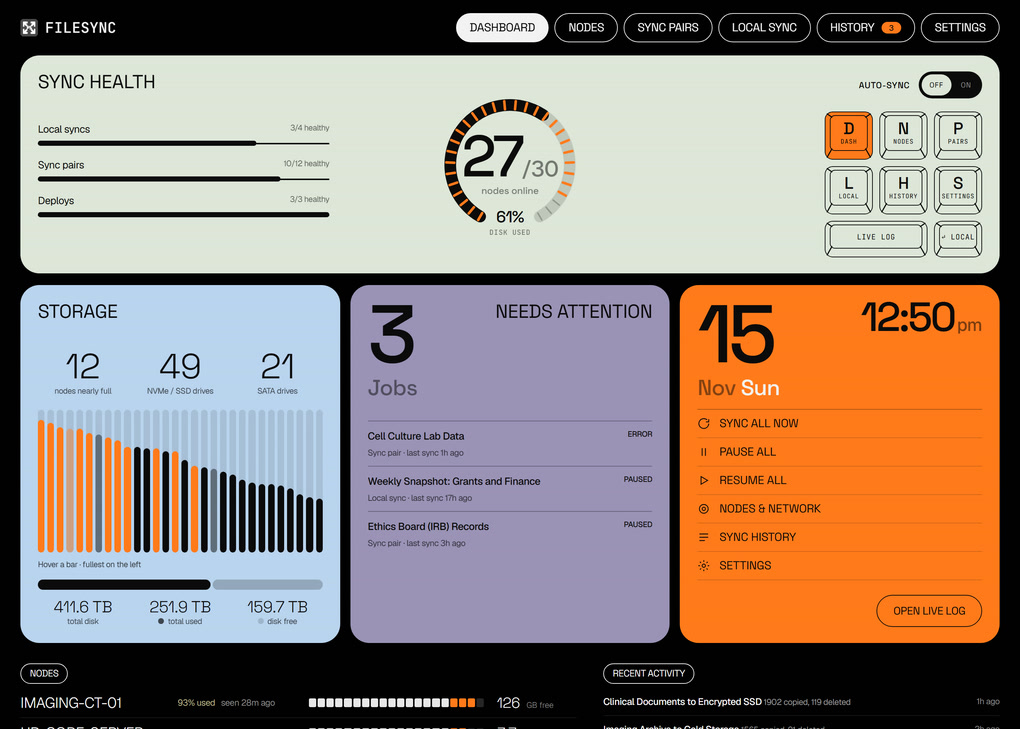
The dashboard answers the first question of the day: is everything in step. Sync health shows how many sync pairs, deploys and local backups are healthy, and a dial shows how many nodes are online. Jobs that have stopped, failed or been paused are listed under Needs Attention, so nothing waits unnoticed.

Storage is reported per PC and per drive, including NVMe, SATA and USB disks, with the fullest machines on the left. A research team learns that a sequencing workstation is nearly full before a run fails, rather than after.

Every Node On One Map

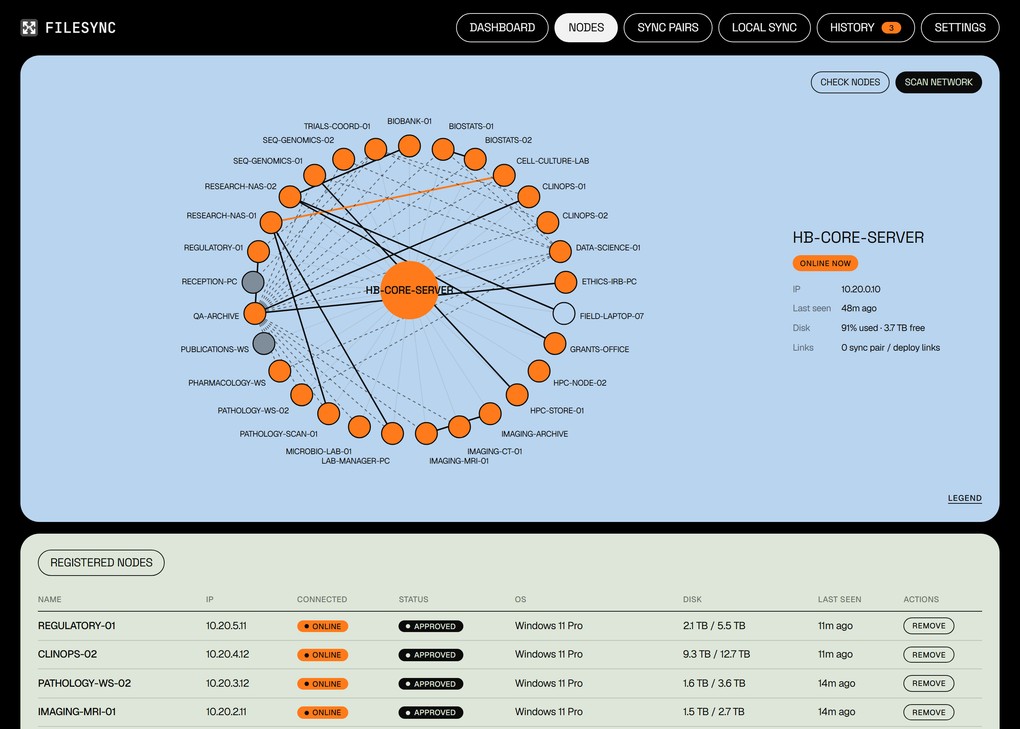
Every PC that runs the FileSync node appears on the network map, linked to the server and to the PCs it syncs with. Hover a node to see its address, when it was last seen, how full its disks are and how many jobs it belongs to. PCs that have gone quiet are shown in grey.

The node installs as a single program that sits in the system tray, opens its own firewall port and finds the server on the network by itself. A new PC is on the map within seconds of starting it.

Sync Pairs For Documents And Research Data

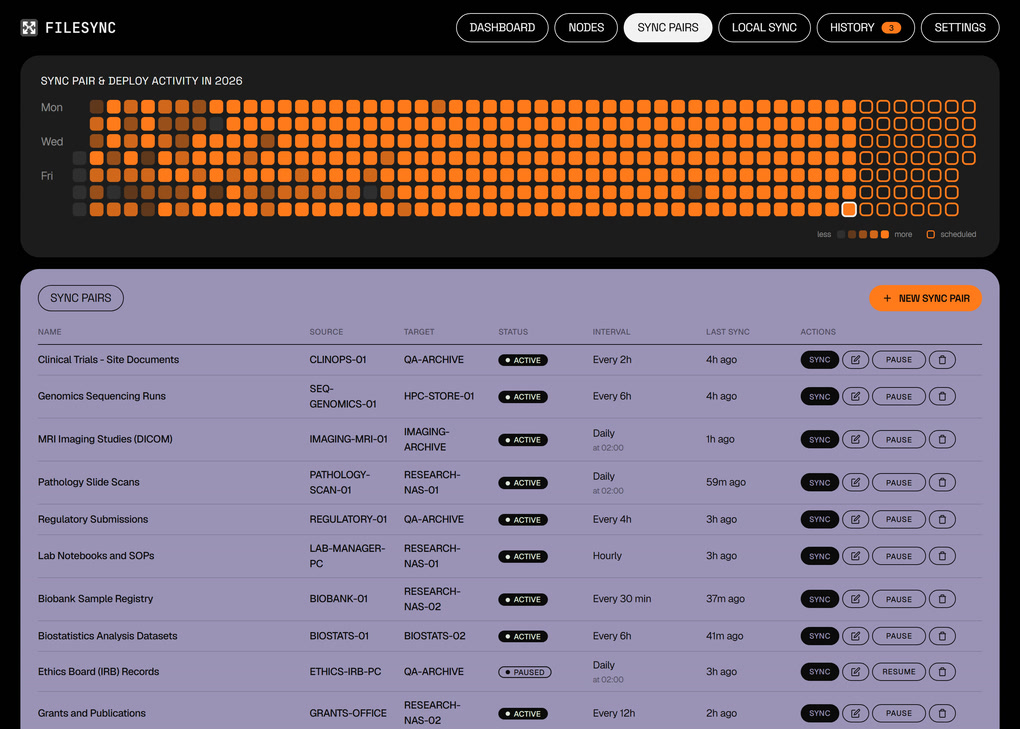
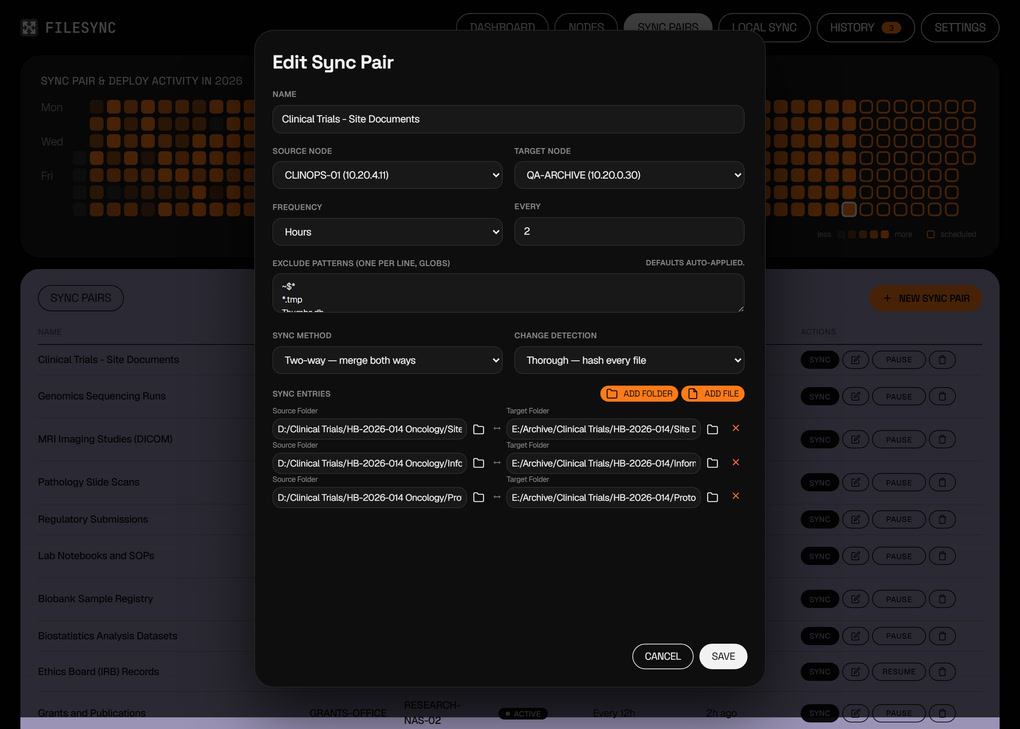
A sync pair keeps folders on two PCs in step. One pair can hold several folders, so a clinical trial team can sync its site documents, informed consent forms and protocol amendments to the archive server as one job. In the demo, sequencing runs flow from the genomics workstations to the research file server, MRI studies flow to the imaging archive and pathology slide scans flow to shared storage.

Each pair chooses how it syncs. Two-way merges changes from both sides, Update copies new and changed files in one direction, and Mirror also removes files that were deleted at the source. Change detection is either fast, by size and date, or thorough, by hashing every file, which suits regulated records where a silent change matters.

Schedules run from every few minutes to monthly, at a set time and day, or as soon as a PC comes back online, which suits a field laptop that only joins the network now and then. Exclude patterns skip temporary and lock files, and a bandwidth cap keeps large imaging transfers from slowing everyone else down.

Deploy To Every Lab PC At Once

A deploy pushes the same folders and files from one PC to many. In the demo, the current SOP library, safety data sheets and lab safety manual go out from the quality archive to 18 lab PCs every morning, and analysis templates go to the research workstations each week. Every target is listed with its own status and the time it last received an update, so the quality team can see at a glance which PCs hold the current version.

Scheduled Local Backups

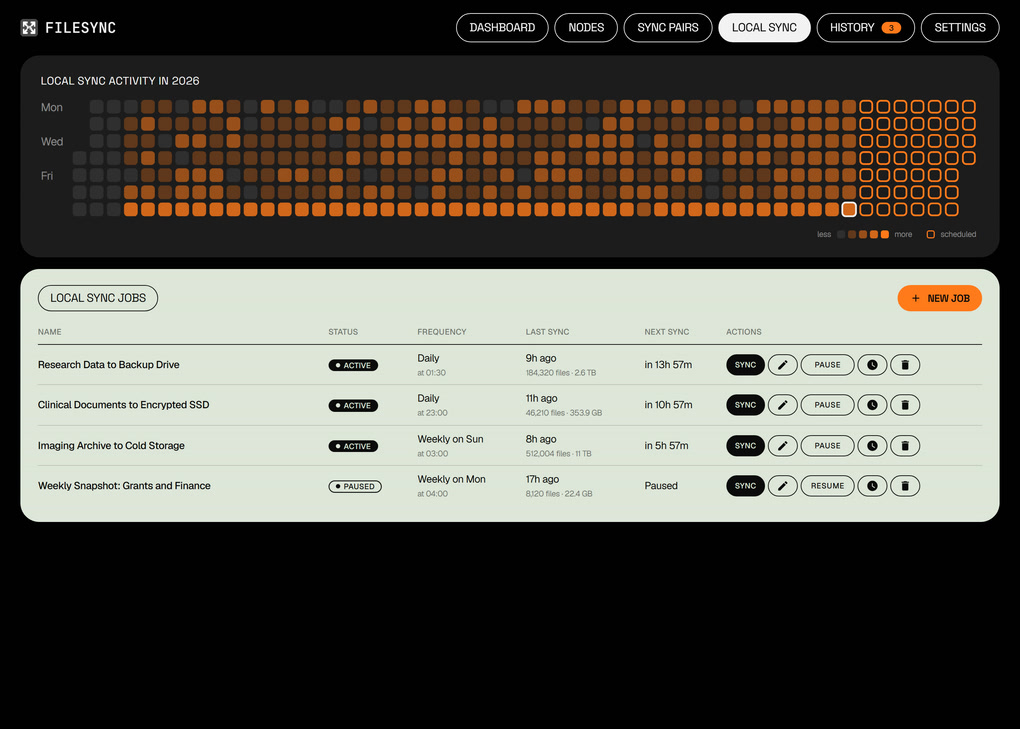
Local sync jobs copy folders from one drive to another on the server itself, on a schedule. Research data goes to a backup drive every night, clinical documents go to an encrypted drive, and the imaging archive goes to cold storage once a week. Each job keeps a count of files and data copied, and a full log of what changed on every run.

A Full History, Ready For Audit

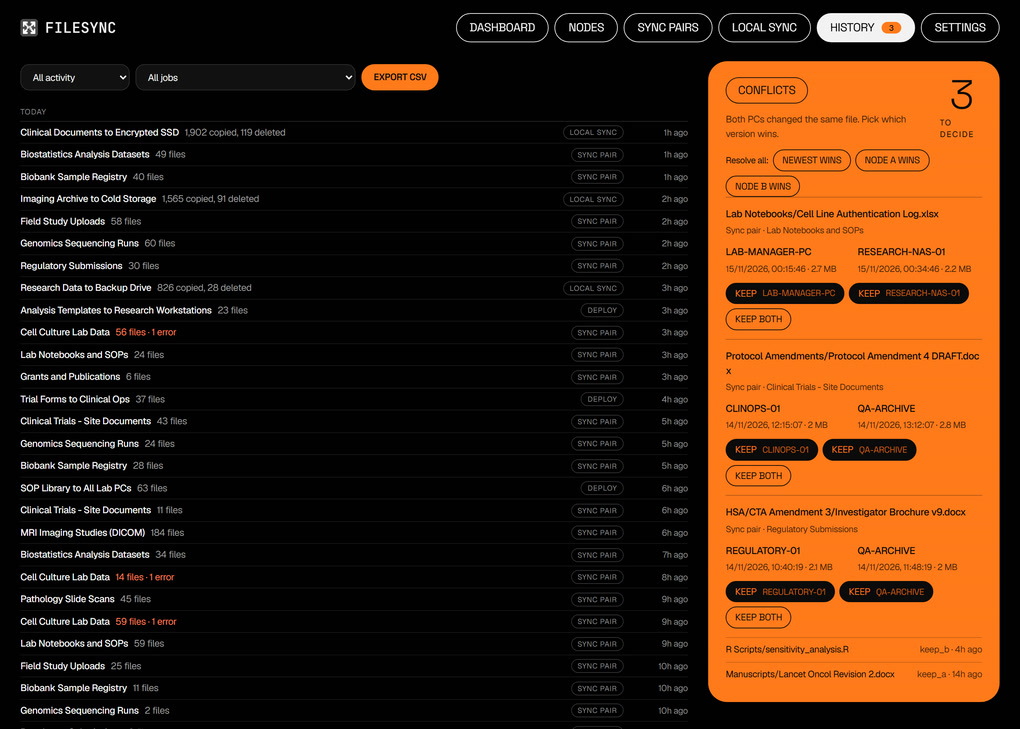
The history page lists every sync run, deploy and local backup, grouped by day, with the files moved and any errors. Filter by type or by job, and export the list to CSV for an audit trail. A calendar across the top shows a whole year of activity, along with the runs already scheduled.

Conflicts Wait For A Person

When the same file changes on both PCs between syncs, FileSync does not guess. The file is set aside as a conflict, with the date and size of each version, and someone decides: keep one side, keep the newest, or keep both. When a protocol amendment is edited at a trial site and at the archive on the same afternoon, both edits survive until a person chooses.

Private By Design, Built In Rust

FileSync runs entirely on your own network. The server and nodes talk to each other directly, so documents, patient-related records and research data stay on hardware you control, with no per-user subscription and no storage limit beyond your own disks. The dashboard opens in its own desktop window on the server, and colleagues can reach it from a browser with a password.

The engine, the node and the desktop app are written in Rust and ship as ready-to-run folders. There is no installer to manage and nothing else to set up on each PC.

FileSync gives a team one place to see where its files are, keeps them in step across every PC, and keeps them off outside cloud services. It is designed and built in Singapore by MT Labs.

Get in touch to see FileSync running on a network like yours, and we’ll map out the sync jobs with you.

Arrange a demo with us today.

FAQ

What is FileSync?

FileSync is a self-hosted file sync system built by MT Labs. It keeps folders in step across the Windows PCs and servers on your network, runs scheduled backups and pushes the same files to many PCs at once, all managed from one dashboard.

Do our files go through a cloud service?

No. The FileSync server and the nodes on each PC talk to each other directly over your own network, so documents and research data stay on hardware you control.

What is the difference between a sync pair and a deploy?

A sync pair keeps folders on two PCs in step, either both ways or in one direction. A deploy pushes the same folders and files from one PC out to many PCs, such as a current SOP library going to every lab workstation.

What happens when the same file is edited on two PCs?

FileSync sets the file aside as a conflict and shows the date and size of each version. A person then chooses to keep one side, keep the newest version or keep both, so no edit is lost by accident.

How often can FileSync run a sync?

Each job has its own schedule, from every few minutes to monthly, at a set time and day. A job can also run as soon as a PC comes back online, which suits laptops that only join the network now and then.

How many PCs can FileSync manage?

FileSync is built for networks of many PCs. The demo on this page shows 30 nodes across labs, imaging, clinical teams and file servers, and every node appears on the network map with its disk space and last check-in.

Can we use FileSync for backups as well as sync?

Yes. Local sync jobs copy folders from one drive to another on a schedule, for example research data to a backup drive every night or an imaging archive to cold storage each week. Every run is logged and the history can be exported to CSV.